
Console Server – Secure Remote Device Management via RS232 Serial
A Sollae console server puts the RS232 console ports of your routers, switches, firewalls, servers, PDUs, and industrial controllers on Ethernet, so you can manage, configure, and recover devices remotely — without an on-site visit.
Read more
What Console Servers Are Used For in Practice
Most teams buy a serial console server to reduce downtime and regain control when something breaks at a remote location. Common deployment scenarios include:
- Remote console access to network gear (routers, switches, firewalls) for configuration, maintenance, and recovery
- Serial access for industrial equipment — controllers, gateways, UPS/PDUs, legacy RS232 devices
- Out-of-band management during outages when the production network path is unstable
- Centralized rollouts across multiple branches with repeatable settings and fewer manual steps
Out-of-Band Management: Why Console Servers Belong on Every Remote Rack
A console server gives you an alternate path to critical devices when production networking is degraded. Console traffic typically runs on a separate management network or VLAN — or over a secured WAN path — so recovery work is always possible even if the main network is down.
Compare Serial Console Server Models: 8-Port, 16-Port, 32-Port
| Model | Ports / Form factor | Security and key functions | Best for |
|---|---|---|---|
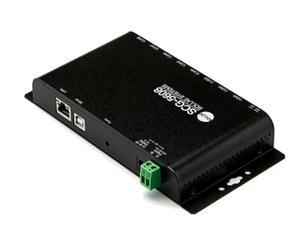
| SCG-5608 | 8× RS232 (RJ45), compact device; dual power input option | TLS v1.2, IPv4/IPv6, RFC2217 | Remote cabinets, industrial installs, small racks needing secure console access |
| CSE-T16 | 16× RS232 (RJ45), 19-inch rack type, AC powered | SSL/TLS, Telnet, RFC2217, Virtual COM (ezVSP) | Network closets and branch racks with mid-density console needs |
| CSE-T32 | 32× RS232 (RJ45), 19-inch rack type, AC powered | SSL/TLS, Telnet, RFC2217, ezVSP and configuration tools | Dense racks and console aggregation for larger environments |
| SCG-5632 | 32× RS232 (RJ45), AC powered; rack-friendly footprint 43.7 × 4.4 × 22.8 cm | TLS + SSH, ACL access control, COM port scanning, batch configuration | Teams needing structured access control and faster 32-port rollout workflows |
Why Sollae Console Servers Are a Practical Alternative to Premium Console Managers
When engineers search for the best serial console server, the core question is usually: which product gives me secure access, enough ports, and reliable performance — without paying for enterprise features that won't get used? Sollae targets that balance:
- Essential remote device management features without bloated licensing or complex maintenance
- Right-sized lineup: compact 8-port (SCG-5608), rack 16-port (CSE-T16), rack 32-port (CSE-T32), and a feature-strong 32-port option (SCG-5632)
- Security where it matters: TLS v1.2 / SSH on select models for environments with stricter access policies
- Deployment helpers: Virtual COM drivers and configuration tools that speed up rollout and day-2 operations
Console Server Buyer Checklist
- Port count per rack or site: 8, 16, or 32 is usually the first decision.
- Security requirements: encrypted remote access? Prioritize TLS v1.2 (SCG-5608) or TLS + SSH (SCG-5632).
- Power strategy: for remote or unattended sites, consider dual power input options to reduce outage risk.
- Access control: multiple admins sharing ports? Look for ACL-style control and structured workflows (SCG-5632).
- Legacy tool compatibility: rely on Virtual COM / RFC2217-based tools? Confirm feature support on the chosen model.
-
 Vendor:Sollae Systems
SCG-5608 / 8-Port RS232 Console Server
Regular price 635.25 EURRegular price -
 Vendor:Sollae Systems
CSE-T16 / 16-Port RS232 Console Server
Regular price 1 085.37 EURRegular price -
 Vendor:Sollae Systems
CSE-T32 / 32-Port RS232 Console Server
Regular price 1 754.50 EURRegular price -
 Vendor:Sollae Systems
SCG-5632 / 32-Port Console Server
Regular price 1 899.70 EURRegular price


