
Sollae Serial Device Servers and IoT Devices for Industrial Ethernet Networking
Sollae serial device servers and IoT devices connect RS232, RS422, and RS485 equipment to IP networks over Ethernet or Wi-Fi — letting IT/OT teams monitor, control, and manage serial assets remotely without replacing proven hardware.
Read more
What Serial Converters and IoT Devices Are Used For
Teams buy Sollae serial converters and connectivity devices to reduce on-site visits and bring legacy serial equipment into modern IP-based workflows. Typical applications include:
- Remote device management for routers, switches, firewalls, PDUs, and servers through RS232 console ports
- Serial equipment modernization — meters, controllers, and sensors connected to SCADA, dashboards, and monitoring platforms over Ethernet
- Remote troubleshooting when on-site visits are costly or slow — branches, field cabinets, industrial sites
- Multi-site standardization where one consistent connectivity approach reduces spares cost and support overhead
Serial Device Server Types: Console Server vs Serial Ethernet vs Serial WLAN
Three product categories cover the main deployment patterns for serial device servers and related IoT devices. Choose based on what you are connecting and whether Ethernet or Wi-Fi is available on site:
| Category | What it does | Best for |
|---|---|---|
| Console Server | Aggregates RS232 console ports (8–32 ports) for secure out-of-band remote management | Network gear and IT infrastructure — OOB access, recovery, configuration, and troubleshooting |
| Serial Ethernet Device Server | Serial to Ethernet converter for RS232/RS422/RS485 to IP over wired Ethernet (TCP/UDP, tunneling, Virtual COM) | Industrial and commercial devices that need to join a wired IP network without replacing existing equipment |
| Serial WLAN Device Server | Wireless serial to TCP/IP over Wi-Fi — TCP Server/Client, UDP, Soft AP for on-site setup | Hard-to-cable locations, temporary installs, and retrofits where Wi-Fi is faster than running Ethernet |
Serial to TCP and Serial to UDP: Understanding Connection Modes for Serial Converters
Choosing the correct operating mode on a serial converter determines how your software and devices communicate. Sollae IoT devices support the modes used most by system integrators and IT/OT teams:
- TCP Server: your application initiates the connection to the device server — the most common mode for stable, persistent links
- TCP Client: the device server connects outbound to your host — useful when the device sits behind NAT or a firewall
- UDP mode: lightweight datagrams for telemetry and broadcast-style data flows
- Serial tunneling: pair two device servers to extend a serial link transparently over Ethernet or WAN
- Virtual COM / RFC2217: expose a remote serial port as a local COM port for legacy Windows software that expects a hardware port
Key Features Across Sollae Serial Device Servers and IoT Devices
Sollae serial device servers are built for real deployments — industrial cabinets, remote branches, and field sites — not just lab conditions. Across the range:
- Industrial temperature ranges (up to −40 °C to +85 °C on key models) for cabinets and outdoor enclosures
- Protection circuits — over-voltage, reverse-voltage, surge, and opto-isolation on select models
- SSL/TLS and MAC/IP filtering on supported units for secure remote access beyond a protected LAN
- IPv4/IPv6 dual stack throughout the range for compatibility with modern network infrastructure
- Soft AP commissioning on WLAN models — configure on-site without a pre-existing Wi-Fi access point
- Virtual COM driver (ezVSP) for seamless integration with COM-port-based Windows applications
Serial Device Server Buyer Checklist
- What are you connecting? RS232/RS422/RS485 serial instruments → serial ethernet or WLAN device server. Network console ports → console server.
- Ethernet or Wi-Fi? Fixed infrastructure with cabling available → wired ethernet device server. Cabling is expensive, impractical, or temporary → serial WLAN device server.
- Connection mode: TCP Server, TCP Client, UDP, serial tunneling, or Virtual COM — choose based on how your software or host initiates the connection.
- Security requirements: if the device is reachable beyond a protected LAN, prioritize SSL/TLS and access filtering on the chosen model.
- Port count and scale: 1-port models for single-device retrofits, 2-port or 4-port for cabinet consolidation, 8–32 port console servers for rack-level management.
-
 Vendor:Sollae Systems
CSE-H53N / Industrial RS232 Ethernet Device Server
Regular price 67.76 EURRegular price -
 Vendor:Sollae Systems
CSE-H55N2 / Industrial RS422/RS485 Ethernet Device Server
Regular price 82.28 EURRegular price -
 Vendor:Sollae Systems
CSE-T16 / 16-Port RS232 Console Server
Regular price 1 085.37 EURRegular price -
 Vendor:Sollae Systems
CSE-T32 / 32-Port RS232 Console Server
Regular price 1 754.50 EURRegular price -
 Vendor:Sollae Systems
CSE-H21 / Industrial 2-Port RS232 Ethernet Device Server
Regular price 226.27 EURRegular price -
 Vendor:Sollae Systems
CSC-H64 / 4-Port Serial Ethernet/WLAN Device Server
Regular price 319.44 EURRegular price -
 Vendor:Sollae Systems
CSW-H85N / Serial WLAN Device Server
Regular price 133.10 EURRegular price -
 Vendor:Sollae Systems
CSW-H85F / Serial WLAN Device Server
Regular price 139.15 EURRegular price -
 Vendor:Sollae Systems
CSW-H85K2 / Serial WLAN Device Server
Regular price 139.15 EURRegular price -
 Vendor:Sollae Systems
SCG-5632 / 32-Port Console Server
Regular price 1 899.70 EURRegular price -
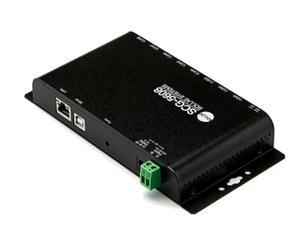 Vendor:Sollae Systems
SCG-5608 / 8-Port RS232 Console Server
Regular price 635.25 EURRegular price


