
Serial Ethernet Device Server – Industrial Serial to Ethernet Converter (RS232 / RS422 / RS485)
Sollae serial ethernet device servers connect RS232, RS422, or RS485 equipment to a standard 10/100 Ethernet network, letting you monitor, control, and integrate legacy serial devices over IP — without replacing them or writing custom networking code.
Read more
What Serial to Ethernet Converters Are Used For
Teams buy a serial to ethernet converter to reduce on-site visits and bridge serial-only equipment into IP-based systems. Common applications include:
- Remote monitoring and control of meters, controllers, barcode readers, weigh scales, and PLC-adjacent devices
- Extending serial links over IP (serial tunneling) when distance or physical access is a constraint
- SCADA and dashboard integration for continuous data access from serial instruments
- Remote service access to industrial equipment that still relies on RS232/RS485 console ports
- Multi-site modernization to standardize device connectivity across branches or plants
Serial to TCP and Serial to UDP: How Device Server Modes Work
A serial ethernet device server maps your serial data stream into IP packets. The operating mode determines who initiates the connection and how data flows:
Compare Industrial Ethernet Device Server Models
| Model | Ports / Interface | Key strengths | Best for |
|---|---|---|---|
| CSE-H53N | 1× RS232 (DB9M), 10/100 Ethernet | IPv4/IPv6, SSL, MAC/IP filtering, Virtual COM (ezVSP), serial tunneling | Single legacy device: PLC service ports, RS232 instruments, meters |
| CSE-H55N2 | 1× RS422/RS485 (terminal block), 10/100 Ethernet | Noise-resistant industrial design, IPv4/IPv6, SSL, MAC/IP filtering, Virtual COM | RS485 field devices, noisy industrial environments, long-run serial networks |
| CSE-H21 | 2× RS232 (DB9M), 10/100 Ethernet | Electrically isolated ports, surge protection, SSL/SSH options, Virtual COM | Two serial devices per cabinet, noisy plants, sites needing extra isolation |
| CSC-H64 | 4× RS232/RS422/RS485 (DB9M), Ethernet + WLAN via USB dongle | Soft AP for Wi-Fi setup, WPA-Enterprise, IPv4/IPv6, Virtual COM | Multi-device serial aggregation, mixed interface environments, Wi-Fi-optional sites |
Industrial Reliability and Security: What Buyers Compare
Pages that rank well for industrial ethernet device server searches emphasize three things: durability, flexible TCP/UDP modes, and secure access. Sollae covers all three with practical features that reduce operational risk:
- Industrial temperature ranges (up to −40 °C to +85 °C on key models) for cabinets and field environments
- Protection circuits for over-voltage, reverse-voltage, and over-current on select models
- Isolation and surge protection options where noise immunity is critical
- SSL/TLS and MAC/IP filtering on supported units for controlled remote access
- IPv4/IPv6 dual stack for modern network compatibility
Serial to Ethernet Converter Buyer Checklist
- Interface: RS232 (CSE-H53N / CSE-H21) vs RS485/RS422 (CSE-H55N2) vs mixed ports (CSC-H64).
- Mode required: TCP Server/Client, UDP, or serial tunneling (device pairs).
- Legacy software: need a COM port in Windows? Confirm RFC2217 and Virtual COM driver support.
- Environment: noisy plant or harsh temperature? Choose isolation, surge protection, and industrial operating ranges.
- Security: if the device is reachable beyond a protected LAN, prioritize SSL/TLS and access filtering.
-
 Vendor:Sollae Systems
CSE-H53N / Industrial RS232 Ethernet Device Server
Regular price 67.76 EURRegular price -
 Vendor:Sollae Systems
CSE-H55N2 / Industrial RS422/RS485 Ethernet Device Server
Regular price 82.28 EURRegular price -
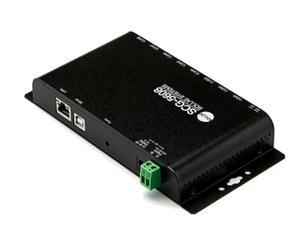 Vendor:Sollae Systems
SCG-5608 / 8-Port RS232 Console Server
Regular price 635.25 EURRegular price -
 Vendor:Sollae Systems
CSE-H21 / Industrial 2-Port RS232 Ethernet Device Server
Regular price 226.27 EURRegular price -
 Vendor:Sollae Systems
CSC-H64 / 4-Port Serial Ethernet/WLAN Device Server
Regular price 319.44 EURRegular price


